Welcome to DISDRODB!#
Motivation#
The raindrop size distribution (DSD) describes the concentration and size distributions of raindrops in a volume of air. It is crucial for modeling the propagation of microwave signals through the atmosphere (key for telecommunication and weather radar remote sensing calibration), to improve microphysical schemes in numerical weather prediction models, and to understand land surface processes (rainfall interception, soil erosion).
The need for understanding the DSD spatio-temporal variability has led scientists all around the globe to “count the drops” by deploying DSD recording instruments known as disdrometers. Numerous measurement campaigns have been run by various meteorological services, national agencies (NASA, NCAR, ARM, …), and university research groups. However, only a small fraction of those data is easily accessible. Data are stored in disparate formats with poor documentation, making them difficult to share, analyse, compare and reuse. Additionally, very limited software exists or is publicly available for DSD processing.
In response to these challenges, the disdrodb software provides a set of tools to download, process and archive disdrometer data following the best open science practices.
The goal of the DISDRODB initiative is to:
create a decentralized archive of disdrometer data from all around the world,
promote the exchange of data across the scientific community,
document the available data and type of disdrometer sensors,
provide a common framework to process disdrometer data,
develop a set of scientific products to study the DSD spatio-temporal variability at global scale,
create a community to develop, share and improve DSD models and algorithms.
Software#
The software currently enables you to:
download raw disdrometer data from stations in the DISDRODB Decentralized Data Archive,
upload raw disdrometer data to the DISDRODB Decentralized Data Archive,
read raw measurements from over 400 disdrometer stations and save them in a standard NetCDF format (DISDRODB L0 product).
The disdrodb software can ingest data from various disdrometer sensors and manufacturers, and it is designed so that everyone can easily add support for new instruments.
Currently, disdrodb enables processing of data acquired from the following disdrometer sensors:
Distromet RD-80 (
RD80),OTT Parsivel (
PARSIVEL),OTT Parsivel2 (
PARSIVEL2),Thies Laser Precipitation Monitor (
LPM).
If you have data from other disdrometer types and would like to contribute to the DISDRODB project, we welcome your help. We’re especially interested in adding support for:
Campbell Present Weather Sensor 100 (
PWS100),Eigenbrot Optical Disdrometer 470 (
ODM470),Vaisala Forward Scatter Sensor FD70 (
FD70),Joanneum Research Two Dimensional Video Disdrometer (
2DVD).
Data Archive#
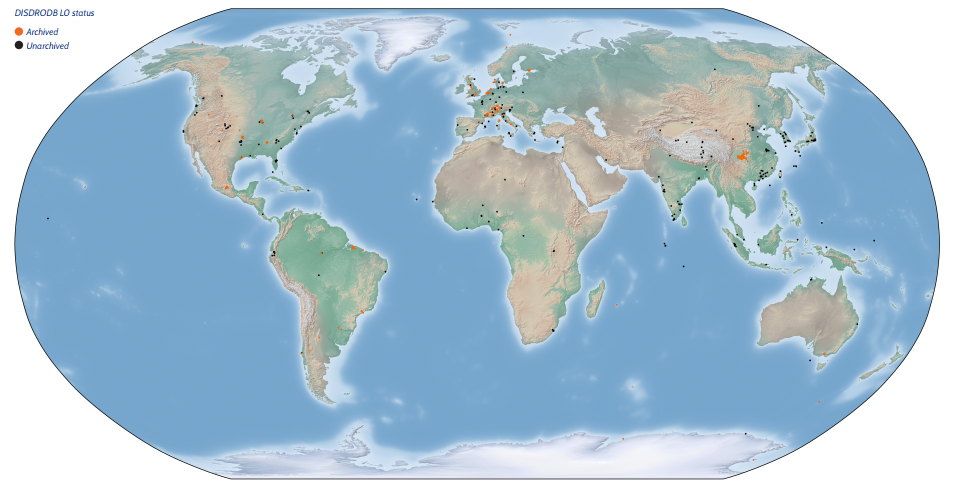
The DISDRODB Decentralized Data Archive collects disdrometer data from all around the world.
The data are stored in remote data repositories but are easily accessible through the disdrodb software.
The metadata of each stations are stored in a centralized repository hosted on GitHub.
The currently available disdrometer stations are depicted in the figure below.
Community#
The DISDRODB Working Group is a open community of scientists and engineers interested in advancing the DISDRODB initiative.
We are currently finalizing the development of the DISDRODB L1 product, featuring quality-checked disdrometer data, along with a suite of scientific-research-oriented DISDRODB L2 products.
Your ideas, algorithms, data, and expertise could significantly shape the future of DISDRODB products, and we would be happy to have you part of this collaborative project.
If you are eager to contribute or simply curious about what we do, please do not hesitate to reach out.
Feel warmly invited to join the DISDRODB Slack Workspace and say hi !
Documentation#
- Installation
- Quick Start
- Products
- Metadata Archive
- Station Metadata
- Archive Processing
- Readers
- Sensors Configurations
- How to Contribute New Data
- Step 1: Fork and download the DISDRODB Metadata Archive
- Step 2: Install disdrodb in editable mode
- Step 3: Define the DISDRODB Configuration File
- Step 4: Add metadata to the DISDRODB Metadata Archive
- Step 5: Add raw data to the DISDRODB Data Archive
- Step 6: Define the
raw_data_glob_pattern - Step 7: Define the reader name and add a prototype reader to the disdrodb software
- Step 8: Implement the reader
- Step 9: Test launching the DISDRODB L0 processing
- Step 10: Compress the raw text files
- Step 11: Add reader testing files to the disdrodb python package
- Step 12: Upload your raw data on Zenodo
- Step 13: Test the raw data download
- Contributors Guidelines
- Maintainers Guidelines
- Software Structure
- Project Contributors